
Kigo DisneyPlus Video Downloader for Mac
Download videos from Disney Plus & Disney+ Hotstar for offline viewing with multilingual audio tracks and subtitles retained. 10X Download Speed!
Download videos from Disney Plus & Disney+ Hotstar for offline viewing with multilingual audio tracks and subtitles retained. 10X Download Speed!
Kigo DisneyPlus Video Downloader for Mac is the ideal Disney+ downloader for Disney+ & Disney+ Hotstar subscribers. With it, you can not only download a wide variety of movies and TV shows from Disney Plus, but also save them as MP4 or MKV files, making it easy to watch them offline on Mac, other computers, devices, or media players.
With the adoption of advanced technology, download speeds are boosted up to 10X. Kigo DisneyPlus Video Downloader for Mac can download a 40-minute TV episode in just 10 minutes, saving you valuable time. Besides, there are no download limits.


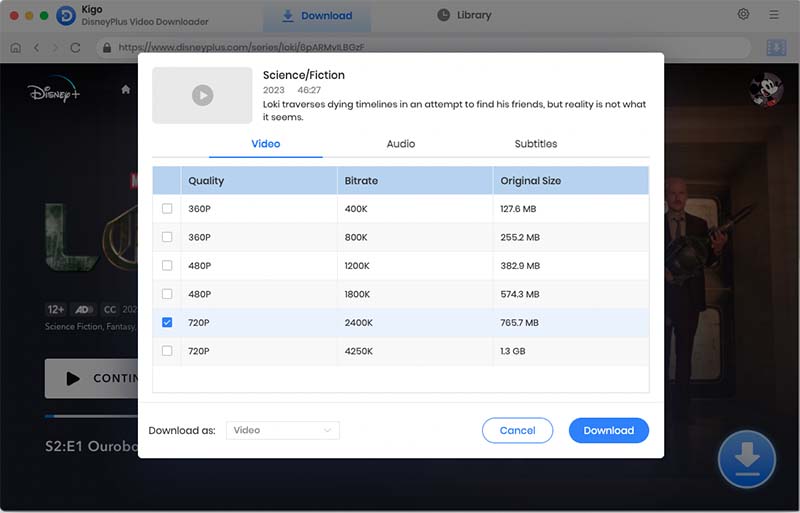
Kigo DisneyPlus Video Downloader for Mac allows you to choose your video quality, supporting everything from Low to High Definition (up to 1080p for Disney+ Hotstar content).
By downloading Disney Plus videos to MP4 or MKV, you are free to play the downloaded Disney+ content on various device, transfer files between devices, copy them to USB drive, or burn them to DVD.
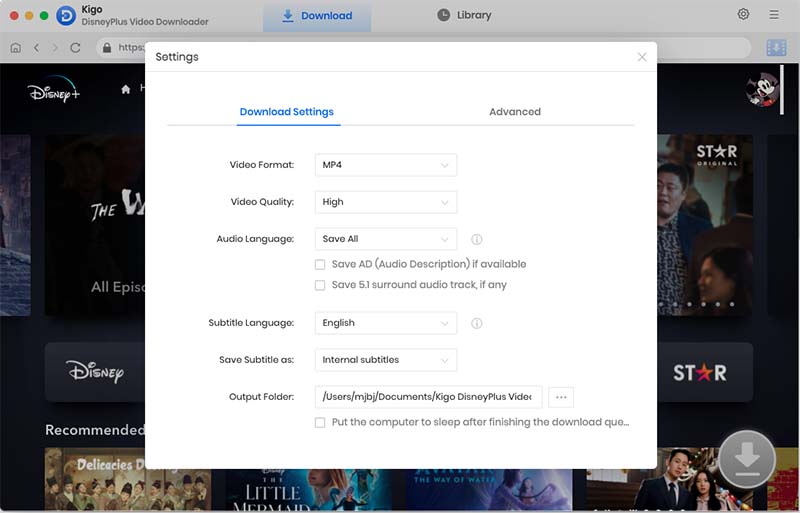
To cater to Disney+ fans' diverse language preferences and accessibility needs, Kigo DisneyPlus Video Downloader for Mac can retain multilingual audio tracks and subtitles available in the original content while downloading Disney+ movies in HD quality. You can easily adjust these preferences in the settings window.
Kigo DisneyPlus Downloader for Mac also supports saving 5.1 Dolby Atmos for a better offline viewing experience. Audio Description (AD) tracks can be preserved as well, allowing visually impaired or blind users to fully enjoy the videos.


Kigo DisneyPlus Video Downloader for Mac can download movies from Disney Plus on Mac with subtitles saved as SRT files, allowing you to edit them. If you prefer switching subtitles while watching, choose the internal subtitle option, as the program can save multiple subtitle languages within a single video.
If you prefer to keep subtitles as part of the video, choose the hardcoded subtitle option when downloading Disney+ movies. This is especially useful if you plan to burn the videos to a CD or DVD.
Through the system setup proxy server, users can customize the use of the setup script. Then you can copy the script address to Kigo so that you can download some videos from other countries at your leisure.


No matter what kind of plan you subscribe to, Kigo will automatically remove the ads during the Disney+ video download process.

Embedded with the Disney+ web player, it allows you to browse the Disney+ library, find your target video, and download it all in one place.

H.264 and H.265 video codecs are enabled to save Disney+ videos with an optimal file size according to your device's storage.

Preserve metadata (title name, year, genre, etc.), for easy and organized classification management.

Reduce CPU stress and speed up Disney+ movie downloads with the help of hardware acceleration.

Offer timely customer service. Enjoy free updates and 24/7 technical support during the subscription period.



By adhering to these simple guidelines, you will be able to fully enjoy the convenience and pleasure brought by Kigo Disney+ Video Downloader while maintaining legal use standards. If you have any questions or need support, feel free to contact us.
Download and install Kigo Disney+ Video Downloader on your PC or Mac, and gain the ability to download your favorite Disney+ videos and enjoy offline with ease.

“Kigo Disney+ Video Downloader had a better download speed, and saved a lot of time than the recording-type programs. ”

“Thanks, Kigo Disney+ Downloader. I can watch my favorite Pixel movies from Disney Plus website on Mac. The video quality is excellent!”

“Kigo Disney+ Video Downloader can download children's movies during idle time in the region, and return them on weekends. ”




 Screenshot
 System Requirements
 Usage Guidelines
